AMD uProf File Write
This post will demonstrate a simple file write vulnerability (CVE-2025-61969) in the AMD uProf AMDPowerProfiler.sys driver that results in privilege esclation. If you are new to Windows driver reversing and exploitation, I highly recommend checking out the Exploit Reversing series.
I first came accross this driver when reviewing zeze’s work on IOCTLance. They had previously reviewed the AMD uProf driver suite and uncovered several bugs. I noticed that the software is updated regularly and figured it could be a good target for improving my Windows reversing and bug hunting skills.
The Vulnerability
The AMDPowerProfiler.sys driver registers the device \\\\.\\AMDPowerProfiler0 . This driver contains
the function IoctlSetOutputFileHandler which can be called by any user via IOCTL
0x222008 . Within this function there is a call to ZwCreateFile in which user input is passed as
the OBJECT_ATTRIBUTES->ObjectName value. This allows a low privileged user to create a file
anywhere on the system. Additionally, the OBJECT_ATTRIBUTES->SecurityDescriptor value is
set to 0 (NULL), which means that the created file will inherit the security setting of the parent directory.

By default the ACL setting for C:\Windows\System32 is CREATOR OWNER:(OI)(CI)(IO)(F) ,
which means that a low privilege user that is able to leverage the file creation from the driver
into C:\Windows\System32 will have full control (F) over the created file.

For a proof of concept, we can create ualapi.dll. The Windows Print Spooler service attempts to load this DLL everytime it is started/restarted.

In order to create this file, a user must first register a client through the IoctlRegisterClient
function via IOCTL 0x222004 to pass the HelpCheckClient check within IoctlSetOutputFileHandler. IoctlRegisterClient accepts a client type (1 or 2) and outputs a registration ID. The return registration ID must be saved and passed within the call to IoctlSetOutputFileHandler.

Additionally, the user must format the file path in a particular way. There is a bug in the IoctlSetOutputFileHandler function
that results in incorrect string length calculation for the target file path. Here is the pseudo code for the buggy string calculation:
int maxChars = 260; // maximum WCHARs allowed
WCHAR *strPtr = (WCHAR *)(v7 + 2); // pointer to user string
int remainingChars = maxChars;
int actualCharCount = 0;
int status = 0;
while (remainingChars)
{
    if (*strPtr == L'\0') // found null terminator
    {
        actualCharCount = maxChars - remainingChars; // number of WCHARs
        break;
    }
    strPtr++;
    remainingChars--;
}
// if no null terminator was found
if (remainingChars == 0)
{
    actualCharCount = 0;
    status = STATUS_INVALID_PARAMETER;
}
// claimed length vs actual
if (status == 0 && v7[1] == actualCharCount)
{
// BUG: memmove copies (chars + 1) *BYTES*, WCHAR
    memmove(Dst, strPtrStart, actualCharCount + 2);
}
else
{
    DbgPrint("Error: Provided string size doesn't match actual string
length!\n");
}
The driver validates the length of a Unicode string, but calls memmove as if it is an ANSI string. This code scans a wide character (UTF-16) string to find its actual length, then validates that it matches a claimed length stored in v7[1]. If validation passes, it copies the string using memmove. The bug is that memmove expects a size in bytes, but the code passes the size in characters. This copies only half of the intended data. So, a supplied path of C:\Windows\System32\dummy.log becomes C:\Windows\Sys. We can satisfy the path validation check by doubling the length of our target path and padding it with extra characters. The driver also maintains a file lock on the output file. We can set the output file a second time to a different file path in order to remove the file lock.
With the code execution flow fully explained, here are the summarized exploitation steps:
- Register our process as a client
- Create the logging file to DLL hijack path
- Set the logging file to a different path to remove file lock
- Write DLL hijacking payload to previous logfile
- Escalate privileges with Print Spooler restart
Running the the exploit and letting the service restart confirms the vulnerability!
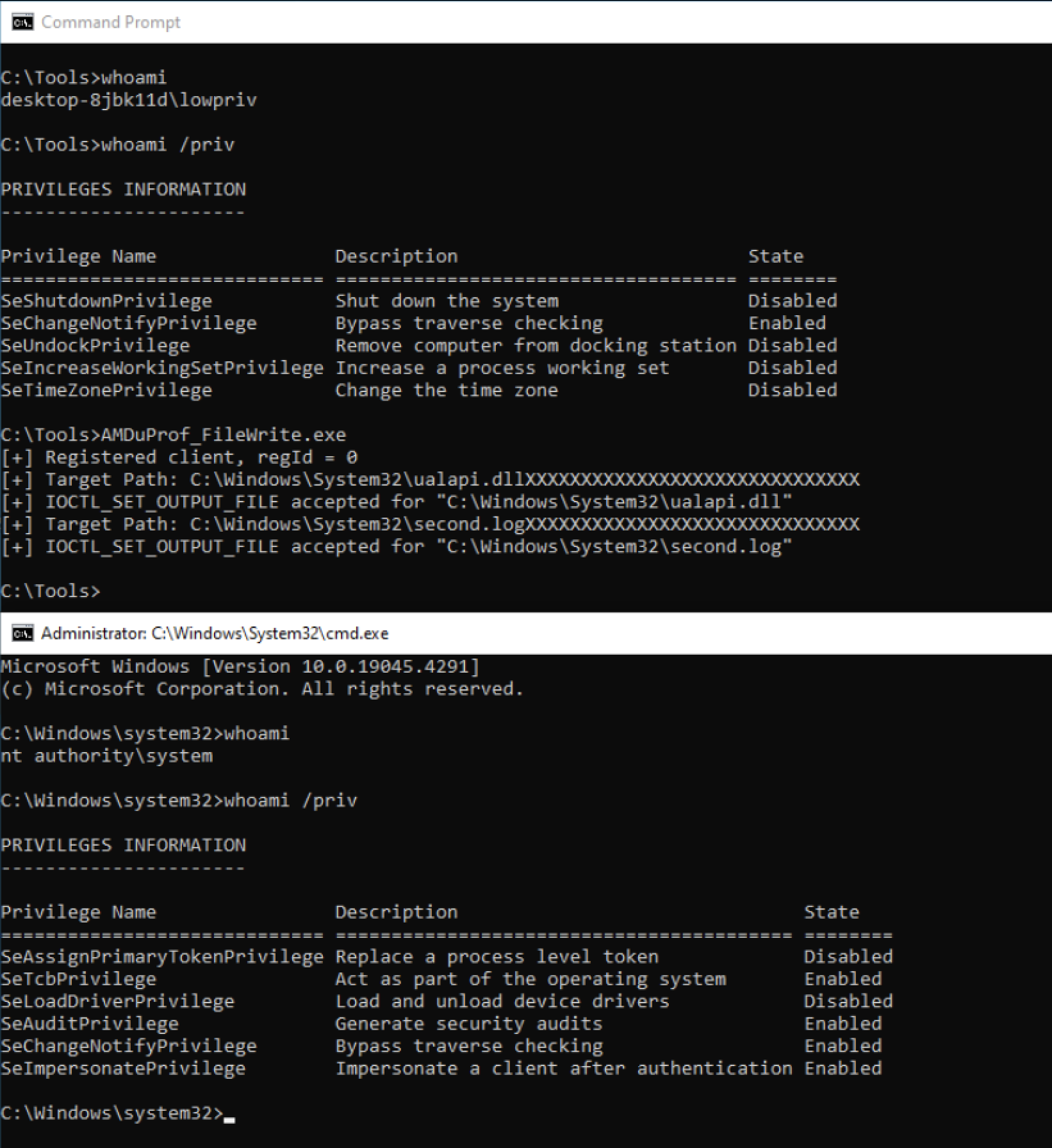
The full exploit code can be found here
References
Security Advisory:
https://www.amd.com/en/resources/product-security/bulletin/amd-sb-9022.html
Original Research:
https://github.com/zeze-zeze/HITCON-2023-Demo-CVE-2023-20562
Original uProf Presentation:
Windows Kernel Drivers 101:
https://exploitreversing.com/wp-content/uploads/2024/05/exploit_reversing_01-1.pdf
IRP Major Function Codes:
https://learn.microsoft.com/en-us/windows-hardware/drivers/kernel/irp-major-function-codes
DLL hijacking target:
https://www.hexacorn.com/blog/2016/11/08/beyond-good-ol-run-key-part-50/
AMD uProf: